

For businesses and developers
Reading a check in the Verath Console
What a business sees for each identity check, and what Verath keeps.
Every check your business runs, through the API, the Verify screen or a bulk CSV, appears under Customers in the Verath Console. Open a customer to see each check on them, then open a check for its full log.
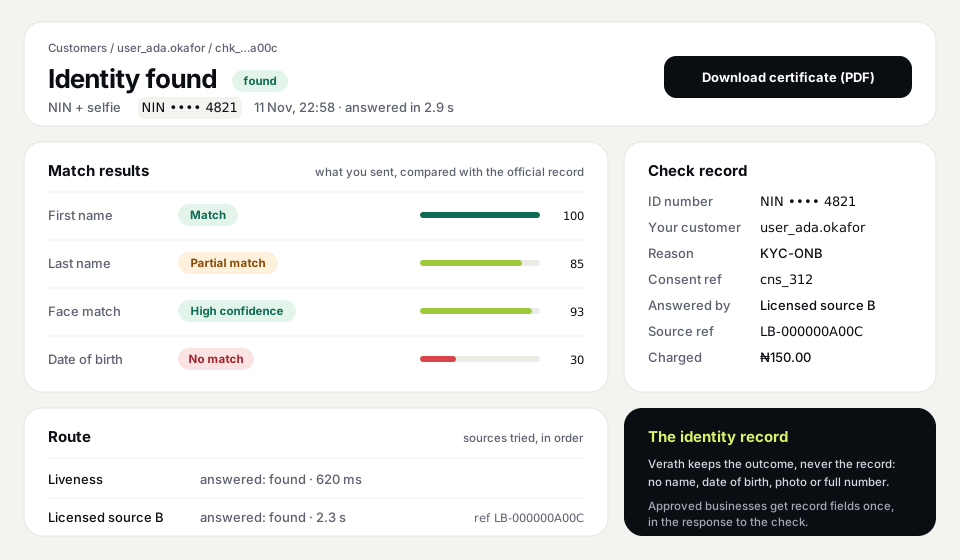
What each check shows
- The ID number, masked. Only the last 4 digits, such as NIN •••• 4821. For checks made through a verify link it's the last 2, as the person was told on their phone. Verath never keeps the full number.
- A result for each field you sent. Names, date of birth and phone show Match, Partial match (close: a typo, a middle name used as a first name, or a day and month swapped) or No match, with a score out of 100.
- Face and liveness confidence. For a selfie check: High, Medium or Low.
- The route. Which sources were tried, in order, how long each took, and the reference the answering source gave the check. Quote it if you ever query a result.
- The check record. Your reason for the check, your consent reference, times, the charge, and who ran it.
The certificate
Each finished check has a Download certificate (PDF) button. The certificate shows the outcome and the details above, for your customer file or an auditor. It holds no identity record: no name, date of birth, photo or full number from the official record.
Where's the identity record?
Verath doesn't keep it. If your business is approved for records, the record fields come back once, in the response to the check, for you to store in your own system under your own data protection duties. The console shows them on the Verify screen at that moment. Afterwards, the check log shows what Verath keeps: the outcome.
The same details come back in the API as id_number, match_result and source_ref. See Developers in the console for the API reference.
More in For businesses and developers
- Verath for banks, fintechs and lenders
- Getting started as a developer
- Is Verath a verification provider?
- The Verath Console home page
Still need help? Send us a message. Never include your NIN, BVN, PINs or codes.